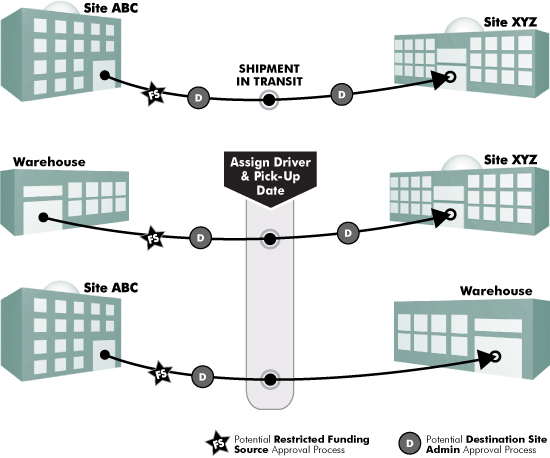
TIPWeb-IT allows items to be moved from one site to another site through Site to Site Transfers. Warehouses are special kinds of sites. Below is an overview of the 3 ways a transfer can take place.
Approvals may be required for two reasons (established by the district level):
A district wide rule to require the destination site’s administrator(s) to approve any items intended to be shipped to their site. It is possible for this approval process to occur twice before the transfer can be received by the destination site.
A restricted Funding Source is associated with
one or more tags and requires the identified TIPWeb-IT user to approve
its addition to the transfer in order to be shipped from its current
location.
A transfer progresses through the following statuses from the time it is created until all items have been received:
New
Submitted
In Transit
Receiving
Complete
Approval Workflow for Transfers
This preference defines the approval or sign-off levels for the transfer of items . The approval workflow allows for up to 5 user approvals for a transfer before it can be shipped. Approval is based on user type or specific individuals.
If the transfer has an approval workflow, when the transfer reaches a status of Pending Approval, the appropriate e-mail notifications, if set, will be sent out. When a user looks at a transfer, they will see an approval progress indicator.
A  lock indicates
approval is still required from an appropriate individual; a
lock indicates
approval is still required from an appropriate individual; a  lock indicates
approval has been received from an appropriate individual; a
lock indicates
approval has been received from an appropriate individual; a lock indicates the transfer
is for an approval level that is not yet available. Any of the appropriate
individuals can deny the transfer.
lock indicates the transfer
is for an approval level that is not yet available. Any of the appropriate
individuals can deny the transfer.
Driver Notifications on the Home page quickly communicate transfers assigned to the respective driver (includes alerts regarding warehouse deliveries and site pickups). Clicking on a Driver Notification opens a window listing each respective transfer assigned to the driver.